According to the resource Android Centralso, citing sources in the industry, produced for Google Android-smartphones in 2016 its traditional? partner – the Taiwanese company HTC, instead of the usual labeling Nexus will receive «Google» inscription in front and in the center of the back of the device. So far, there are two models with screen diagonals of 5 inches and 5.5 inches, the working title Marlin and Sailfish.
The publication reports on the possibility of the emergence of smart phones with the marking symbol «G», but so far no one can give an exact information on the new labeling, as well as describe the further fate of the brand Nexus.
Six Years of Solitude
The transition to the new branding of Google Android-smartphone will end the six-year history under the brand name Nexus phones. The first smartphone in the lineup in December 2009, manufactured by HTC device was introduced under the name Nexus One, have become the latest released in 2015 models of Nexus 6P and 5X.
Nexus Markings may disappear from Google smartphone
As part of the branding of smartphones and tablets on the Nexus program different times from Google are collaborating industrial partners like Samsung, LG, HTC and Huawei.
Google-backgrounds 2016: what’s new
The new smartphones running Google brand, according to Android Central, will be supplied with a package of additional software. In addition, each model will have a modified user interface instead of the standard version of Android.
This is the main difference of new products brand smartphones Nexus, which originally shipped with the base version of Android. Perhaps it is the desire Google to promote their smartphones with additional applications, services and functions hidden reason for not using the brand Nexus in its original incarnation.
Will there be branded tablets and Google smart watch?
Despite the approach of announcements of new products running the new OS Android Nougat, big intrigue is still new Google’s policy for Android-smartphone under its own brand, especially in light of the guidance announced last summer Google «completely new” strategy for the hardware platforms.
so far there is no reliable data about Google plans to release aNY KIND a new tablet models. However, at Android Central is the first, as yet unconfirmed information about Google plans to release before the end of 2016 the two smart Android Wear watches under its own brand.
According to the resource Android Centralso, citing sources in the industry, produced for Google Android-smartphones in 2016 its traditional? partner – the Taiwanese company HTC, instead of the usual labeling Nexus will receive «Google» inscription in front and in the center of the back of the device. So far, there are two models with screen diagonals of 5 inches and 5.5 inches, the working title Marlin and Sailfish.
The publication reports on the possibility of the emergence of smart phones with the marking symbol «G», but so far no one can give an exact information on the new labeling, as well as describe the further fate of the brand Nexus.
Six Years of Solitude
The transition to the new branding of Google Android-smartphone will end the six-year history under the brand name Nexus phones. The first smartphone in the lineup in December 2009, manufactured by HTC device was introduced under the name Nexus One, have become the latest released in 2015 models of Nexus 6P and 5X.
Nexus Markings may disappear from Google smartphone
As part of the branding of smartphones and tablets on the Nexus program different times from Google are collaborating industrial partners like Samsung, LG, HTC and Huawei.
Google-backgrounds 2016: what’s new
The new smartphones running Google brand, according to Android Central, will be supplied with a package of additional software. In addition, each model will have a modified user interface instead of the standard version of Android.
This is the main difference of new products brand smartphones Nexus, which originally shipped with the base version of Android. Perhaps it is the desire Google to promote their smartphones with additional applications, services and functions hidden reason for not using the brand Nexus in its original incarnation.
Will there be branded tablets and Google smart watch?
Despite the approach of announcements of new products running the new OS Android Nougat, big intrigue is still new Google’s policy for Android-smartphone under its own brand, especially in light of the guidance announced last summer Google «completely new” strategy for the hardware platforms.
so far there is no reliable data about Google plans to release aNY KIND a new tablet models. However, at Android Central is the first, as yet unconfirmed information about Google plans to release before the end of 2016 the two smart Android Wear watches under its own brand.
Android Central, citing sources familiar with the situation , reports that Google refused to release smartphones under the brand Nexus “pure» Android
The following two smartphones that were supposed to go under the brand name Nexus, -. we know them by “code” names HTC Marlin and Sailfish – receive different branding. Instead, Nexus logo on them will show off a large letter «G» (Google).
So it will look like the next smart phone HTC – Nexus inscription was replaced by the letter G
Another important change will be that the future Google-smartphones will not be supplied with” clean »Android – at they will have a special version of Android 7.0 Nougat, probably with changes in the interface and additional applications in the opening set. Like it or not, we will know very soon -. Likely in early October,
If it proves true, the LG Nexus 5X (review) and Huawei Nexus 6P (review) will be the last representatives of the famous line of smartphones Google.
If you have found a mistake in the text of the news, please select it and click Ctrl + Enter
From the very beginning of Android, Google took a rather unconventional numbering scheme for new versions of the system. Basic version numbers were reserved for major changes in the user interface of the system and greater nebula significant change in the operating system, according to ITbukva.com.
But, it appears that Google is implementing a more traditional and predictable numbering with the adjustment version of Android 7.0 Nougat .
According to the extraordinary insider Evans Blass, the Google decided to use the 7.1.x release of quarterly numbers to update the correction version, which, as confirmed already on the way. Unfortunately, if Blass rights, even in these versions of the strange numbering scheme will be used. He claims that the first version of the adjustment for Nougat will be Android 7.1, but the second and third – Android 7.1.1 and 7.1.2, respectively
This is how you can see, does not give a lot of sense from the point of view of traditional numbering schemes, but gives at least some Android logic because, as Google downloads security updates.
Traditional 7.x update will be the first major update that will bring bug fixes and update performance and the like, in this case the patches will 7.xx accident safety. However, Google has a monthly security updates, which are recorded separately, so the use of this method will allow Google to release first a correction version (7.1), with important functions (rumored to possibly start module Nexus and / or Google Assistant is), and then bring small bug fixes to the version 7.1.x and will still have the monthly security updates. Then leave Android 7.2 for a different kind of merger with Android O, without disturbing the normal numbering Google Android, which will keep Android 8.0 for the big UI changes.
It is obvious that the whole scheme is still quite complicated, but perhaps Google is really trying to make it more understandable. We’ll have to wait and see.
Liked the news? Share it
<- powered by related thumb items www.waltercedric.com -!>
Recently, the police turned a resident of the city Kotelnich, who said that her bank card was stolen 4 thousand. 500 rubles.
According to the press-service of Ministry of Internal Affairs Department Russia’s Kirov region, during the investigation the police found out that the money was stolen by a virus program installed on your mobile phone «Android» operating system, owned by the victim.
In order not to catch a virus on your phone, the police strongly recommends kirovchanam not connect the service “Mobile Banking” to their smartphones. Best of all the service connected to the phone, which does not have access to the Internet. On smartphones with Android operating system, you need to regularly update anti-virus database. Also, do not believe the criminals, not to transfer money to strangers, not to inform anyone of their data bank card.
It is worth noting that this is not the first time write-off of money with the help of the virus on Android. In early summer, 57-year-old resident of the Leninsky district of the virus copied from the bank card 20 thousand rubles, and 33-year resident of the Oktyabrsky district -. More than 40 thousand rubles.. Both gadget works on the Android operating system.
Recently, the police turned a resident of the city Kotelnich, who said that her bank card was stolen 4 thousand. 500 rubles.
According to the press-service of Ministry of Internal Affairs Department Russia’s Kirov region, during the investigation the police found out that the money was stolen by a virus program installed on your mobile phone «Android» operating system, owned by the victim.
In order not to catch a virus on your phone, the police strongly recommends kirovchanam not connect the service “Mobile Banking” to their smartphones. Best of all the service connected to the phone, which does not have access to the Internet. On smartphones with Android operating system, you need to regularly update anti-virus database. Also, do not believe the criminals, not to transfer money to strangers, not to inform anyone of their data bank card.
It is worth noting that this is not the first time write-off of money with the help of the virus on Android. In early summer, 57-year-old resident of the Leninsky district of the virus copied from the bank card 20 thousand rubles, and 33-year resident of the Oktyabrsky district -. More than 40 thousand rubles.. Both gadget works on the Android operating system.
Users Android, desired to go on the bright side, have long had at its disposal from the Apple app called Move to iOS. In the camp of Google decided to strike back and offered a tool that will allow more smoothly and easily migrate to the iPhone or iPad to Android-powered device.
Tool this is integrated into a new Android 7.0 Nougat operating system and appears before our eyes at the moment of activation of the gadget. Now, in addition to the option of a Google account recovery settings, and content you will be offered the opportunity to transfer the data stored on your iOS-device. To do this, on the start screen, a special option.
Earlier, for those who wish to migrate from iOS to Android, Google has recommended to study the manual, which is not so easy to find. Now, when you first start the device starts a wizard that guides the user through several stages of transition.
These steps, we have to admit, it has not become easier. If you want to transfer your contacts, you need to export information to iCloud in the vCard file, and then import the last in Gmail. Syncing photos and music require inevitable downloading content to Google’s servers.
However, it must be admitted that the company Sundar Pichai still care about “deserters” and trying to simplify their lives. Only now does it become easier after the switch to Android, this is the big question.
In the courtyard of the middle of July – so it’s time to learn how to change the position of a given version of the Android operating system. To answer this question, Google’s staff during the week perform traditional computing. Naturally, at the end of this process, they shared a table with the contents of which we are now acquainted.
Last month was significant for every fan of the green robot. Recall, that’s when it became known that Android Marshmallow is every tenth smartphone. After the May to 7.5 percent, these figures were more than worthy. At the same time, 35.4 per cent received Lollipop, KitKat – 31,6 percent, while Jelly Bean, Ice Cream Sandwich, Gingerbread and Froyo – 18,9, 1,9, 2,0 and 0,1 percent respectively
According to the representatives of the resource android central , this time it looks a little different. In particular, the equivalent of the share of Android Marshmallow is 13.3 percent, and Lollipop, KitKat and Jelly Bean can boast 35.1, 30.1 and 17.8 percent.
As for the older versions, they are still kept afloat unthinkable way. Share Ice Cream Sandwich has dropped to 1.7 percent, Gingerbread – up 1.9 percent, and all those received Froyo 0.1 percent. Conservatives among users of devices running Android is still there.
Does your smartphone received a long-awaited update to Android Marshmallow? Tell it in the comments.
Google plans to use the model of Microsoft and Apple and launch new Android features in the beta testing stage as they become available, without waiting for the launch of the new version of the operating system, according to the publication Ars Technica, has made this conclusion based on an open Google information about the release of the update to Android 7.0 Nougat.
The current scheme
Traditionally, Google releases new Android version once a year: Android 7.0 Nougat was announced in 2016, Android 6.0 Marshmallow – in 2015, Android 5.0 Lollipop – in 2014, etc. After the release of the new version of the company, a few months later, as.. usually produces a large cumulative update, and then, on an occasional basis, -. updates smaller every few months
Certificate changes
With the announcement of Android 7.0 Nougat Google Inc. has not stopped the public beta of new Android 7.0 features, this program is preserved. This leads to the conclusion that the company intends to continue the development of this version and regularly provide users with new features for testing – exactly as do Microsoft and Apple in the relevant programs and Windows Insider Apple Beta Software Program. Major innovations by Microsoft and Apple’s, however, is left to a future version of your Operating system – Windows and OS X.
Thus, it is possible that Google will use the same scheme. Users who like to be among the first to get acquainted with the new platform features, retain access to their testing right up until the moment when they perekochuyut in the final release.
Google plans to use the model of Microsoft and Apple for testing Android
Quarterly update
it is also expected that Google will be releasing major updates Android on a quarterly basis, that is, in general, a more precise timetable than is the case now.
Speaking about the fact that the new test launcher Nexus Launcher is not supported in the current version of Android 7.0, so it requires higher interface level programming (API) – 25, whereas now supported by 24 levels. It is assumed that in the first quarterly update this level will increase by one.
Fighting fragmentation
Quarterly major upgrades to help fight the fragmentation which remains a large the problem of the Android ecosystem. Fragmentation – is the presence of a large number of firmware, which should take into account the parameters of specific devices, resulting in the extra effort and time that developers have to spend on the application adaptation.
If Google will be releasing major updates once a quarter, device manufacturers and other participants in the supply chain will be able to thoroughly prepare for the new release. In theory, this should facilitate the work of developers.
Android devices has reduced the proportion of problem up to 35%
According to the results of recent months Android shows a more robust operating system than iOS. This is evidenced by results of a study of Blancco Technology Group, which specializes in the diagnosis of mobile gadgets.
According to a study in the II quarter of 2016, 58% of devices running on of iOS, there were operational failures. For Android, the figure was only 35%. This is a major achievement, as in the first quarter of 2016 there were systemic problems by 44% Android-devices.
What models of iPhone and iOS applications are denied more often
65% of all errors in the iOS have been linked to crash applications, another 11% – problems with Wi-Fi-connection, and 4% – with headphones. The least stable applications, often causing failure, were Snapchat (17% of all cases), Instagram (14%), Facebook (9%) and Facebook Messenger (5%).
The most ” buggy »iPhone models according to Blancco
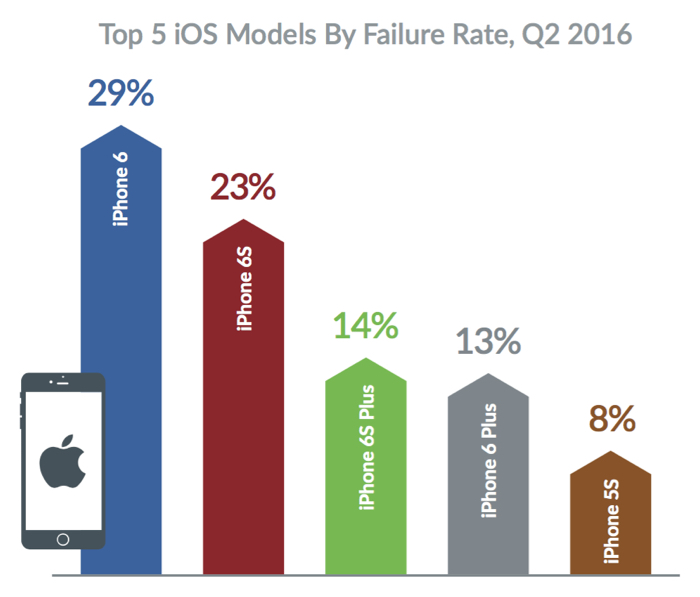
showed himself iPhone 6 (29% of all errors) Among the specific models of smartphones of the least reliable.
Blancco technical experts attribute this to shortcomings 9.3.1 and 9.3.2 updates that were released in April and May 2016, respectively. After their installation users were more likely to complain about the application failure, bad Wi-Fi and fast battery drain.
It is much better to run iPhone 6s (23% of all failures) and iPhone 6s Plus (14%). The Blancco believe that this has contributed to an increase in CPU performance by 70% compared to previous models. Least of all system errors accounted for iPhone 6 Plus (13%) and the iPhone 5s (8%).
The most problematic Android-devices model
Android -Device often “buggy” and stuck due to problems with the camera (10% of all cases) batteries (10%), a touchscreen (7%), a microphone (5%) and the speaker (5%). The greatest number of failures and hangs accounted for Samsung Devices (26% of all cases), followed by the Lenovo (17%), LeTV (17%), the Motorola (11%) and the Asus (7%).
The most problematic brands and Android-smartphone model according Blancco
The most unstable showed himself smartphone Le 1S from LeTV producer (LeEco). It accounts for 10% of all Android failures. It is followed by Le 1S Eco (7%) and Lenovo Vibe K5 Plus (6%). However, the budget model errors Lenovo Vibe K5 Plus experts Blancco include more on account of the device, not the OS. Feedback from users, smartphone overheats quickly discharged and begins to worse work after installing a large number of applications.
According to Blancco, Android works best in North America, which accounts for 29% of system errors than in Asia (41 %). iOS on the contrary more often refuses to North America (59%) than in Asia (52%).
About Blancco
Blancco specializes in information security, diagnostics and repair of devices as well as erasing data and reuse technology by governments and companies. The company, founded in 1997 in Finland and has offices in Europe, North America, Russia, Asia, Australia and the Middle East. Currently, a wholly owned outsourcing company Regenersis.
In 2007, the company was included in the catalog to ensure the integrity and security of NATO information products (NIAPC). Every day, Blancco diagnoses about 29 thousand. Mobile devices around the world.
<-! Banner 468x600 top -> <-! Banner 600x90 before header -> <-! Banner 600x90 before header -> <-! News Start ->
At that time, as the LG V20 is only going to become the first smartphone with Android 7.0 Nougat «out of the box”, the latest version of the operating system has received a smartphone 2013 – Sony Xperia SP. However, he was very latest version of the OS is not on the quickness of the manufacturer, and thanks to the efforts of enthusiasts.
Sony Xperia SP default equipped with Android 4.1 Jelly Bean, then there was an official upgrade to Android 4.3 Jelly Bean. And now a user forum xda-developers with the nickname Adrian DC launched on the device CyanogenMod 13 based Android 7.0 Nougat. Alas, not enthusiastic reports about the challenges encountered during the installation and everything is on the new operating system is working correctly, but judging by the screenshots released, touch screen, GPS, Wi-Fi and Bluetooth function.
Recall that recently another user offline reported the successful launch of Android 6.0 OS on the Nokia Lumia 525 smartphone.
Source: xda-developers
<-! News Settings ->
Rate news
<-!
Share:
->
Facebook
Vkontakte
Classmates
Google +
<- End: news Settings ->
<-! News Stop ->
<-! Block comments ->
Do not operate any comments or vote Read how to clean cookies
<-! Banner 240x400 1st right -> <-! Banner 240x400 1st right ->
<-! Banner 240x400 2nd right -> <-! Banner 240x400 2nd right -> <-! Block Polling in the right column -> <-! Mini quiz block -> <-! Mini quiz block -> <-! Calendar - ->
August
Sun
W
We
Th
Sun
Sat
Sun
! div>
<- End: Calendar -> <- banner lowest ->
<-! ipad magazine promo -> <-!
-> <-! / ipad magazine promo -> <-! Google Tag Manager ->
<-! End Google Tag Manager -> <-! Yandex.Metrika counter ->
Select the HTML-code in the field, copy it to the clipboard and paste it into your blog .
<- concealed unit ->
‘, 3′ ‘}; document.onmousemove = getMouseXY; var mX = 0; var mY = 0; var IE = document.all? true: false; if (IE!) {document.captureEvents (Event.mousemove); } Function getMouseXY (e) {if (IE) {mX = event.clientX + document.documentElement.scrollLeft; mY = event.clientY + document.documentElement.scrollTop; } Else {mX = e.pageX; mY = e.pageY; } Return true; } Var ctx_seen = new Array (); var ctxRnd = Math.ceil (1073741824 * Math.random ()); var ctxrndstr = ‘& amp; rnd =’ + ctxRnd; var els = document.getElementsByTagName ( ‘P’); var ctxc = new Array (els.length); var ctx_ws = new Array (els.length); // Words seen in current paragraph for (var i = 0; i ‘);ctxwpp.push(1);ctxBt.push(3);ctxGt.push(new Array () );} var ws = new Array(‘Π²ΠΈΡΡΡ’,’Π°Π½ΡΠΈΠ²ΠΈΡΡΡ’,’ΠΊΠ°ΡΠΏΠ΅Ρ’,’kaspersky’,’Π±ΠΈΠ·Π½Π΅Ρ’,’ΡΡΠΎΡΠ½’,’trojan’); for (var w in ws) {ctxBw.push (ws [w]); ctxBi.push (821); ctxBlt.push ( ”); ctxBx.push ( ‘
‘); ctxwpp.push (1); ctxBt.push (3); ctxGt.push (new Array ());} var ws = new Array(‘Π²ΠΈΡΡΡ’,’Π°Π½ΡΠΈΠ²ΠΈΡΡΡ’,’ΠΊΠ°ΡΠΏΠ΅Ρ’,’kaspersky’,’Π±ΠΈΠ·Π½Π΅Ρ’,’ΡΡΠΎΡΠ½’,’trojan’); for (var w in ws) {ctxBw.push (ws [w]); ctxBi.push (822); ctxBlt.push ( ”); ctxBx.push ( ‘
‘); ctxwpp.push (1); ctxBt.push (3); ctxGt.push (new Array ());} var ws = new Array (‘ zte ‘,’ samsung ‘,’ zte Π°5′,’blade’,’micromax’,’ΠΊΡΠΏΠΈΡΡ’,’ΡΠΌΠ°ΡΡΡΠΎΠ½’,’Π±Π΅Π»ΡΠΉ’,’Π±ΠΈΠ»Π°ΠΉΠ½’,’ΠΌΠ΅Π³Π°ΡΠΎΠ½’,’ΠΌΡΡ’,’ΠΌΠ°ΡΠΊΠ΅Ρ’,’ΡΠ²ΡΠ·Π½ΠΎΠΉ’,’ΡΠ΅Π½Π°’,’ΡΡΠΎΠΈΠΌΠΎΡΡΡ’,’zte a5 pro ‘,’ micromax bolt d303′,’Π°Π½Π΄ΡΠΎΠΈΠ΄’,’ΡΠ΅Π±Π΅Π½ΠΎΠΊ’,’Π΄Π΅ΡΠ΅Π²ΡΠΉ’,’ΡΠ΅Π½ΡΠΎΡΠ½ΡΠΉ’,’Π½Π΅Π΄ΠΎΡΠΎΠ³ΠΎΠΉ’,’ΠΌΠΎΡΠ½ΡΠΉ’,’Π±ΠΎΠ»ΡΡΠΎΠΉ’,’ΡΠΊΡΠ°Π½’,’Π΄Π»Ρ ΠΈΠ½ΡΠ΅ΡΠ½Π΅ΡΠ°’,’android’,’ΡΠ΅Π»Π΅ΡΠΎΠ½’,’ΡΠ΅ΡΡΡΠ΅Ρ ΡΡΠ΄Π΅ΡΠ½ΡΠΉ’,’gps’,’Ρ ΠΎΡΠΎΡΠΈΠΉ’,’ΡΠ°ΠΌΡΠΉ Π΄Π΅ΡΠ΅Π²ΡΠΉ’,’Π±ΡΠ΄ΠΆΠ΅ΡΠ½ΡΠΉ’,’ΠΏΠΎΠΏΡΠ»ΡΡΠ½ΡΠΉ’,’Π»ΡΡΡΠΈΠΉ’,’2016′,’Π³ΠΎΠ΄’,’ΠΎΡΠΈΡΠΈΠ°Π»ΡΠ½ΡΠΉ’,’Π°ΠΊΡΠΈΠΈ’,’ΡΠ°Π»ΠΎΠ½’,’ΠΈΠ½ΡΠ΅ΡΠ½Π΅Ρ’,’ΠΌΠ°Π³Π°Π·ΠΈΠ½’,’ΠΏΡΠΎΠ΄Π°ΠΆΠ°’,’ΡΡΠ±Π»Ρ’,’ΡΠ΅Π»Π΅ 2′,’ΡΠ΅Π±Π΅Π½ΠΎΠΊ’,’Π΄Π΅ΡΠΈ’,’Π»Π΅ΡΠΎ’,’Π΄Π΅Π²ΠΎΡΠΊΠ°’,’ΠΌΠ°Π»ΡΡΠΈΠΊ’,’Π±ΡΠ°ΡΠ»Π΅Ρ’,’ΠΈΠ½ΡΠ΅ΡΠ°ΠΊΡΠΈΠ²Π½ΡΠΉ’,’ΠΌΠ°Π»Π΅Π½ΡΠΊΠΈΠ΅ children ‘,’ Moscow ” school ” for ΡΠΊΠΎΠ»ΡΠ½ΠΈΠΊΠΎΠ²’,’ΠΊΠ»Π°ΡΡ’,’Π½Π°ΡΠ°Π»ΡΠ½ΡΠΉ’,’ΡΠ°ΠΌΡΡΠ½Π³’,’ΡΠΊΠ°ΡΠ°ΡΡ’,’Π΄Π΅ΡΡΠΊΠΈΠ΅ Phones ‘,’ to Π΄Π΅Π²ΠΎΡΠ΅ΠΊ’,’ΠΈΠ³ΡΡΡΠ΅ΡΠ½ΡΠΉ’,’ΠΈΠ³ΡΠ°’,’ΠΌΠΎΠ±ΠΈΠ»ΡΠ½ΡΠΉ’,’ΡΠΎΡΠΎΠ²ΡΠΉ’,’ΡΠΎΡΠΎ’,’ΡΠ΅Π½Π°’,’Π½Π°ΡΡΠΎΡΡΠΈΠΉ’,’ΡΠΊΠ°ΡΠ°ΡΡ’,’ΡΠ΅Ρ ΠΎΠ»’); for (var w in ws) {ctxBw.push (ws [w]); ctxBi.push (832); ctxBlt.push ( ”); ctxBx.push ( ‘
‘.replace(/$ RND /, ctxRnd)); ctxwpp.push (1); ctxBt.push (3); ctxGt.push (new Array ());} var ws = new Array ( ‘virus’, ‘anti-virus’, ‘ECET’ ‘eset’ ‘avast’, ‘avast’); for (var w in ws) {ctxBw.push (ws [w]); ctxBi .push (824); ctxBlt.push ( ”); ctxBx.push ( ‘
‘); ctxwpp.push (1); ctxBt.push ( 3); ctxGt.push (new Array ());} var ws = new Array ( ‘Postmaster’); for (var w in ws) {ctxBw.push (ws [w]); ctxBi.push (823); ctxBlt.push ( ”); ctxBx.push ( ‘
‘);ctxwpp.push(1);ctxBt.push(3);ctxGt.push (new Array ());} var ctxo = new Array (); // order for (var i = 0; i
Application Compatibility with other versions of OS Android
2.3 or later
The size distribution
3.0 MB
Application Version
22.2.2
In-app purchases
–
Key features:
The powerful filter for incoming SMS-spam;
Smart notifications;
Customizing notifications;
Restore incoming SMS one key;
Widget;
White and black list;
Automatic cleaning message history;
.
Compatible with Android 4.4, Android 5.0, and Android 6.0
Permissions:
The history of the use of devices and applications:
Getting data about running applications
Contacts.:
View Contacts
SMS.:
SMS Reception;
Change SMS and MMS;
View SMS and MMS
Phone.:
View Call History
Photo / multimedia / files.:
Change / delete data on the USB-drive;
View your data on the USB-stick
Memory.:
Change / delete data on the USB-drive;
.
View your data on the USB-stick
Other:
Run the device is switched on;
Unlimited access to the Internet;
View network connections;
Manage vibrate function.
The first impression and configure
Text Blocker meets us a brief user’s guide, which clearly shows how to operate the program. Not without an advertising banner. Interface – English-speaking.
When it comes to the latter, he single window with three dots in the upper right corner. You can (and should be for all Android 4.4 and above) to make Text Blocker default application to work with SMS.
as well as import or clear the message. Statistics are, but only for premium users; to be add-on, you have to pay 299.99 rubles.
As for the settings, then among them the ability to choose the level of anti-spam, configure notifications and activate the vibration, thus making Text Blocker into a kind of SMS-messenger.
Note that you can keep a history of 15 to 90 days. You can also cancel the lock in the system integration.
Before us is simple and intuitive, shareware the SMS-spam with a simple interface In this case, it can be rehabilitated, but effectively blocking spam..
Spam
Emphasis on the notification is not accidental, since the decision as shared in the same time and hides, that is simply suppresses unwanted messages.
At the same time last come without sound and can only be displayed in a Programme. You yourself must move the sender’s whitelist, or risk missing important SMS.
Now let’s see what it’s costing system.
The load on the system
To my surprise trehmegabaytny kid with disabilities consumes not a child – 174 MB RAM with zero CPU load. Hmmm … This battery sags 5.2%, which is not good. The load on the aforesaid – 30% within an hour, the rate of energy consumption – 85.72 mW.
With regard to permits, here saddens unlimited access to the internet, so the banners already flowed 13.3 MB. Text Blocker is compatible with Android 2.3 or higher, contains advertising, paid premium features and weighs in at 17.5 MB system.
Conclusions
From my point of view, Text Blocker app is disastrous, despite the positive reviews on Google Play and evaluation 4.1. Here and the three-put can be a stretch. Among the shortcomings: a paid application, just hide notifications, advertising, eats resources and kills Internet traffic. Some cons, so it deserved.
Evaluation: 1.0 on a scale.
interface
Average (one box)
The ability to self-configure
Yes (at least)
The overall effectiveness of the anti-spam
Average (hides only warning)
Ease of use
Good
The maximum load on the system (CPU / RAM)
0.0% / 150-174 MB
traffic flow by the program
17.5 MB
Battery Consumption
5.2% / 85.72 mW / 60 minutes
The black and white lists
Yes
A centralized anti-spam database
No
Keyword Blocking
No
Passcode Lock
No
Backup and Restore
No
Auto Answer
No
Advertising
Yes
Dear visitors! Comments containing insults, profanity (including disguised mat) , extremist statements, advertisements and spam , deleted regardless of content , and measures can be applied to their respective owners up to ban to write comments and application in the administration of the social network.